
Bottleneck Calculator – Check CPU & GPU Performance Instantly
A bottleneck calculator is a tool that calculates the performance of PC components such as CPU, GPU, Screen Resolution, and RAM to identify bottlenecks. When any component of your PC performs more slowly than others, it creates a bottleneck that reduces the PC’s efficiency.
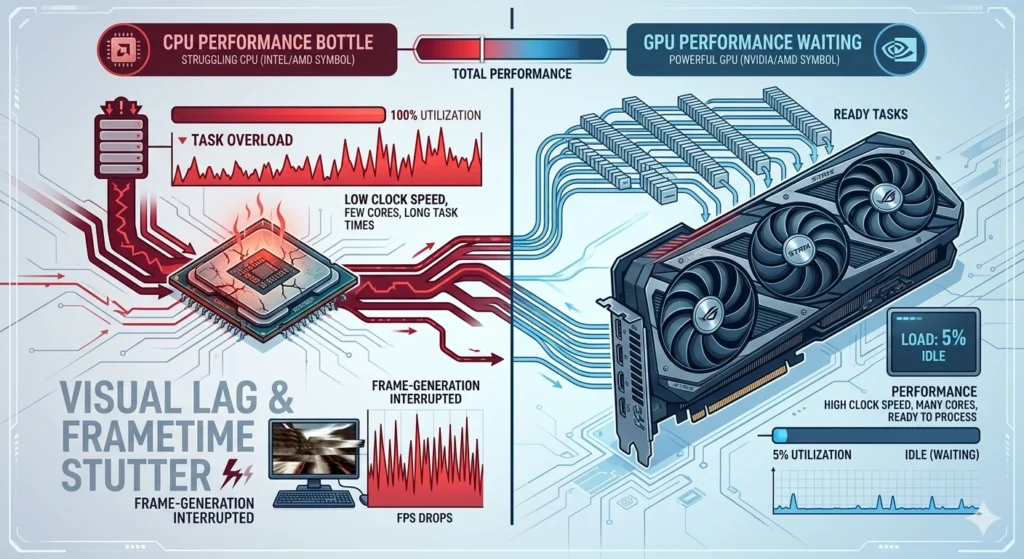
Example: Even if your PC has a powerful graphics card, an outdated processor will make your GPU wait for the data, causing low FPS lag and stuttering.
Want to learn more about how the bottleneck calculator works and improves PC performance? This comprehensive guide will explore all important details such as the calculator usage, features and benefits.
What is the Bottleneck Calculator
A bottleneck pc calculator that examines the cpu and gpu compatibility of PC components to offer detailed insights. It is ideal for gamers, developers, programmers and coders who require optimal PC performance for gaming or complex tasks.Using a trusted bottleneck calculator helps these experts identify potential issues such as low FPS, stuttering and lag.
How the Bottleneck Calculator Works
Our advanced CPU-GPU Bottleneck Calculator compares your system’s specifications, including CPU, GPU, Screen Resolution and more options such as Storage Type, Purpose and RAM. Our calculator provides a bottleneck percentage to show how balanced your setup is.
- A result below 10–20% is healthy and balanced.
- A result above 20% means one component is holding the other back and might need an upgrade.
Instead of replacing your entire system, the calculator helps you identify the weakest component and upgrade only what’s necessary, saving money while improving performance.
Whether you’re a gamer, video editor, streamer, 3d rendering or PC builder, this tool helps you achieve a perfectly optimized setup where every part performs at its best.
How to Use Bottleneck Calculator
This CPU, GPU calculator tool is very easy to use for anyone with little technical know-how.
- Input the Data: Simply include the information required by the calculator, such as CPU, GPU, Screen resoulotion. If you need a comprehensive analysis, there is an option for advanced calculation. Include RAM, storage, and purpose.
- Hit the Button: Now, click the proceed button and wait for the tool to show results. This calculator runs on advanced algorithms to evaluate the performance and compatibility of every components insid your PC.
- Check the Results: The calculator will display the bottleneck percentage score and let you know about the performance of every component.
- A score above 20% indicates a potential performance issue.
- Review the detailed report to see which component is causing the bottleneck.
If your system shows a significant imbalance, consider upgrading or replacing the suggested component to improve performance and achieve smoother operation.
What are the important factors in Bottleneck Calculation
This pc bottleneck checker evaluates every component inside your PC to help you know the ovrall PC progress. Lets breakdown the components for a better understanding.
- CPU: The brain of your PC handling logic, instructions and multitasking. In case your processor, cant work together with graphics card, the computer will slow down.
For example, pairing a powerful GPU like the RTX 4080 with an entry-level Intel Core i3 can lead to noticeable lag and frame drops because the CPU simply can’t process data fast enough for the GPU.
- GPU: The GPU manages the visual data from gaming graphics to video rendering. An outdated GPU can reduce frame rates, visual quality, and responsiveness.
For example, if you install an older GPU like the GTX 960 in a high-end setup, your system will struggle to maintain smooth gameplay and fast rendering. This non-compatibility creates a GPU bottleneck where your CPU waits for the GPU to catch up.
- Screen Resoulotion: Your monitor’s resolution impacts GPU performance. A Higher resolution, like 2K or 4K, requires the GPU to render more pixels per frame, resulting in workload. A weak GPU may perform well at 1080p but struggle at 4K, resulting in lag and frame drops.
- RAM: RAM temporarily stores the data for your PC`s instant access. Insufficient or slow RAM can slow down application performance, multitasking, and even impact the gaming smoothness.
- Storage: PC Storage directly impacts your system’s responsiveness. Traditional Hard Disk Drives rely on spinning disks, making them slower to read & write data. It leads to longer loading times & sluggish file access.
- Cooling System: A good cooling system keeps your computer parts at a safe temperature. When the CPU or GPU gets too hot, it automatically slows down to protect itself. This is called thermal throttling. Because of this, your gaming performance can drop.
You may see low FPS, game lag, stuttering, or slow PC speed. Overheating can create a thermal bottleneck, which affects overall system performance and hardware stability.
Tips Reduce PC Bottlenecks
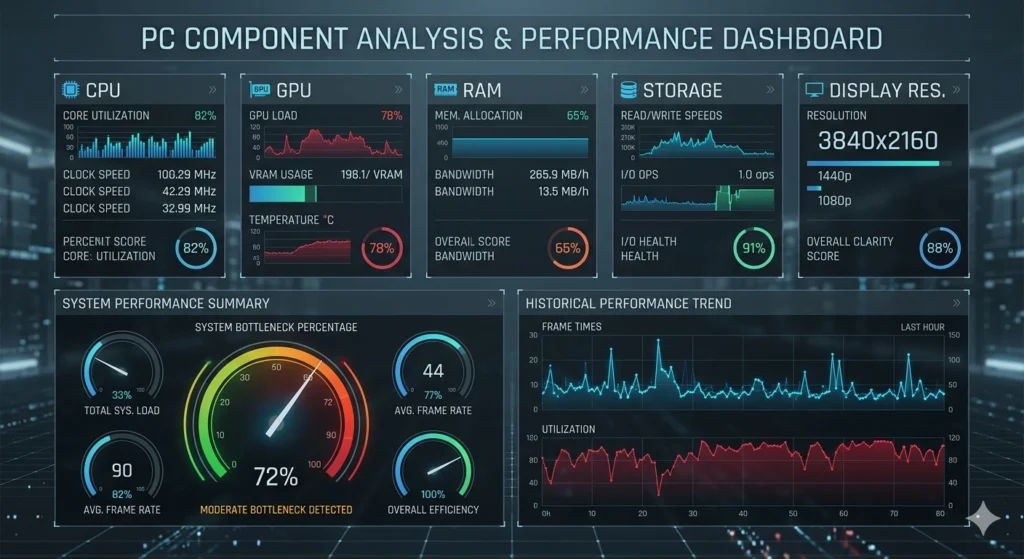
Use this PC hardware performance checker to identify the specific PC component slowing down the overall performance. Finding the problems becomes easy with this system performance test tool. The question is how to fix them?
Let’s answer the question.
Upgrade PC Parts
Whether you have a high-end graphics card, if the PC has an outdated processor, it’s time to replace it with a new one. The same is the case with the graphics card; if that component is slow, consider changing it.
Replace the RAM
In case of regular frame drops, lag and sluttering, the RAM needs to be replaced immediately for an optimal performance.
Maximize Cooling and Airflow
When your CPU or GPU overheats, it automatically slows down to prevent damage reducing performance.
To fix this:
- Add efficient air coolers or switch to liquid cooling.
- Improve case airflow with additional fans or better cable management.
- Regularly clean dust from your system to maintain proper ventilation.
Keeping your system cool ensures consistent, high-level performance without throttling.
Final Thoughts
A Bottleneck Calculator also known as cpu bottleneck checker is an essential tool for those looking to optimize PC performance. It detects which component is limiting your system’s efficiency and causing lag or slowdowns. Moreover, offers smart recommendations to optimize PC performance.
Whether you’re a gamer, video editor, or everyday PC user, fixing bottlenecks early can boost speed, stability, and responsiveness.
If you are planning to build a new PC, using this calculator before buying parts can save you both time and money.
Don’t let hidden bottlenecks hold your system back analyze, upgrade, and unlock your PC’s full potential with our powerful PC Bottleneck Calculator today.