
CPU vs GPU: Which One Delivers Better Performance?
Central Processing Units (CPUs) and Graphics Processing Units (GPUs) are the core engines of every computing device, but as technology advances their roles and the rise of Neural Processing Units (NPUs) for AI are becoming increasingly important.
Today’s computers are expected to handle everything from high-end gaming and 4K video editing to productivity tasks and advanced AI applications. Each type of processor brings its own strengths to the table:
- CPU (Central Processing Unit): Often called the “brain” of the computer, the CPU handles general-purpose tasks and ensures smooth operation across a wide range of applications.
- GPU (Graphics Processing Unit): Designed to process many tasks simultaneously, GPUs excel in rendering graphics, video editing, and tasks that require heavy parallel computation.
- NPU (Neural Processing Unit): A newer addition, NPUs are specialized for AI workloads, accelerating machine learning, neural networks, and other intelligent computing tasks.
Understanding the differences between these processors helps you optimize performance, whether you’re building a gaming rig, editing videos or exploring AI-driven technologies. For precise compatibility, you can use our AI Bottleneck Calculator to check CPU and GPU performance before upgrading. Each has a unique role and together, they power the complex computing experiences we rely on today.
What Is a CPU?
The CPU is often called the brain of a computer and for good reason. Built from billions of tiny transistors a CPU handles all the instructions that keep your system running smoothly. Modern CPUs come with multiple processing cores allowing them to work on several tasks at the same time.
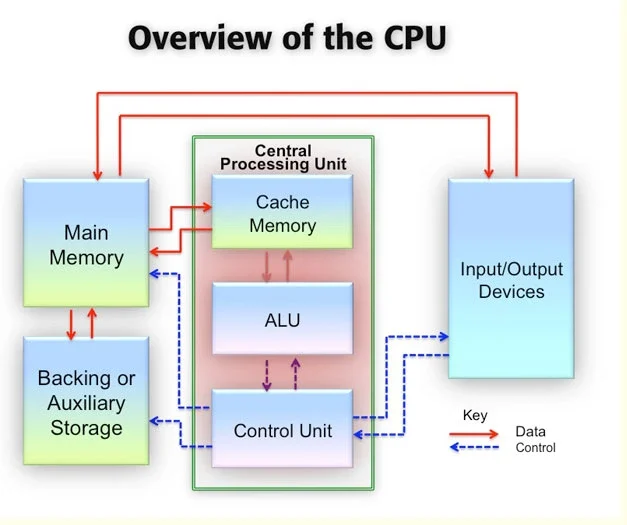
Every action you take on your computer starts with the CPU. Whether you’re opening a web browser, running software, calculating game physics or creating spreadsheets the CPU processes the commands and tells other components what to do. It works closely with the operating system to ensure everything runs efficiently and without delay.
The speed and power of your CPU directly affect how fast programs respond and how smoothly your system performs everyday tasks. From basic computing to demanding workloads, the CPU plays a central role in delivering a reliable and responsive experience.
What Is a GPU?
A GPU is designed to handle tasks that require massive parallel processing. Instead of relying on a few powerful cores, a GPU uses thousands of smaller, highly specialized cores that work together at the same time. This design allows it to process large amounts of data quickly and efficiently.
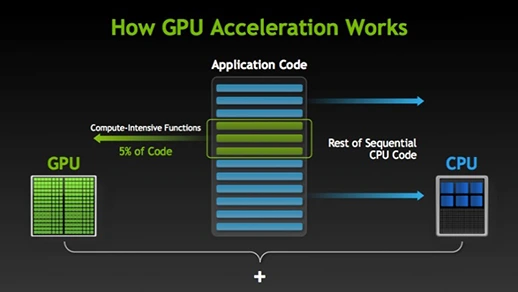
GPUs truly shine in workloads where many calculations happen simultaneously. Graphics performance directly affects frame rates, so understanding what FPS means can help you choose the right hardware for smoother gameplay. By splitting heavy workloads across multiple cores, the GPU delivers performance that a traditional CPU cannot match in these scenarios.
Because of this architecture, modern GPUs play a crucial role not only in gaming but also in content creation, scientific computing, and artificial intelligence, making them an essential component of today’s high-performance systems.
CPU vs GPU: Key Differences You Must Know
Both CPUs and GPUs are essential parts of modern computers. They are built on silicon, process data, and power everything from everyday apps to advanced computing tasks. However, their architecture and purpose are very different, which is why each excels at specific types of work.
A CPU is designed for versatility and low-latency performance. It has fewer but more powerful cores, allowing it to focus on individual tasks and complete them quickly. This makes the CPU ideal for serial workloads, system operations, running databases, and handling tasks where fast decision-making and responsiveness matter most.
A GPU, on the other hand, was originally developed to accelerate graphics and 3D rendering, especially for gaming. Over time, GPUs evolved into highly programmable processors with thousands of smaller cores. This architecture allows them to perform many calculations at the same time, making GPUs extremely effective for parallel workloads such as video processing, scientific simulations, and modern AI and deep-learning applications.
Today, computing is no longer about choosing CPU vs GPU, it’s about using both together. CPUs handle control, logic, and sequential tasks, while GPUs take over data-heavy, parallel workloads. For insights on the most efficient combinations, check out Best CPU and GPU Combo guide. When each processor is used for what it does best, the result is faster performance, better efficiency, and smoother overall computing.
What About a CPU–GPU Combination?
Some modern CPUs come with a built-in GPU, also known as integrated graphics. This means you don’t need a separate graphics card, making these processors ideal for compact and energy-efficient devices like laptops, tablets, smartphones, and many everyday desktops.
A CPU with an integrated GPU offers lower cost, reduced power consumption, and space savings compared to dedicated graphics cards. It can easily handle daily tasks, including web browsing, media streaming, light gaming, and basic video editing. For users who want smooth performance without extra hardware, a CPU–GPU combination is a smart and efficient choice.
Accelerating Deep Learning and AI
Modern CPUs now include neural processing units (NPUs) that work alongside GPUs to speed up AI tasks. These specialized processors are designed to handle AI inferencing, where trained models analyze data and make real-time predictions.
By combining the CPU for control, GPU for parallel processing, and NPU for AI-specific workloads, systems can deliver faster and more efficient deep-learning performance. With enough RAM, this setup becomes a powerful foundation for running and testing AI models.
As AI continues to grow, the CPU + GPU + NPU combination is becoming a standard part of future-ready computing systems.
Decades of Leadership in CPU Innovation
For decades, Intel has played a key role in shaping modern CPU technology. Its journey began in 1971 with the launch of the Intel 4004, the world’s first commercially available microprocessor built entirely on a single chip. This milestone laid the foundation for how computers would evolve in the years to come.
Today, Intel CPUs power a wide range of computing experiences across the familiar x86 architecture. From high-performance Intel® Xeon® Scalable processors used in data centers and cloud environments to energy-efficient Intel® Core™ Ultra processors designed for everyday and edge computing, Intel offers solutions built to handle modern workloads — including AI-driven tasks.
Intel® Core™ Ultra Processors
The Intel® Core™ Ultra processor lineup represents a new generation of CPU design focused on balanced performance and power efficiency. These processors feature an integrated NPU (Neural Processing Unit) to support AI workloads, while select models also include Intel® Arc™ graphics for enhanced visual performance.
By combining CPU, GPU, and AI acceleration into a single chip, Intel® Core™ Ultra processors enable faster AI processing, smooth gaming experiences, and high-quality 4K media playback. This integrated approach helps users get more performance without sacrificing efficiency, making these processors well-suited for today’s demanding applications.
Intel® Core™ Processors (14th Generation)
Intel® Core™ processors (14th gen) are built to handle modern workloads with speed, efficiency, and flexibility. They use Intel’s performance hybrid architecture, which combines faster Performance-cores (P-cores) with power-efficient Efficient-cores (E-cores). This smart core design allows your system to deliver strong performance while handling multitasking more smoothly.
Whether you’re gaming, working, or running multiple applications at once, the 14th gen Intel Core processors intelligently balance workloads to maximize responsiveness and efficiency.
Many Intel Core (14th gen) laptops also come with Intel® Iris® Xe graphics, while select systems feature Intel® Arc™ GPUs. These graphics solutions support hardware-accelerated graphics, ray tracing, and built-in machine learning, making them suitable for laptops, desktops, and professional workstations alike.
Discrete GPU Options from Intel
Intel also offers powerful discrete GPU solutions designed for users who need advanced graphics and compute performance.
Intel® Arc™ GPUs
The Intel® Arc™ GPU lineup delivers high-performance graphics for gaming, content creation, and creative workflows. These GPUs support ray tracing, AI acceleration, and modern graphics technologies, helping users enjoy smoother gameplay and faster rendering.
Intel® Data Center GPUs
For enterprise and cloud environments, Intel® Data Center GPUs are designed to support demanding workloads such as AI, analytics, rendering, and simulations. These GPUs add massive parallel processing power to data-center CPUs, enabling faster and more efficient large-scale computing.
From CPU to GPU and Hybrid Performance
Today’s computing needs go beyond just raw CPU power. Whether you want to enhance gaming performance, create professional content, or explore AI and deep learning, Intel processors with integrated graphics offer a balanced combination of CPU and GPU capabilities in a single solution.
For users who need even more graphics or compute power, Intel’s discrete GPU options make it easy to scale performance. From personal devices to enterprise data centers, Intel’s CPU and GPU ecosystem is designed to deliver acceleration, efficiency, and reliable performance across a wide range of use cases.
Conclusion
Choosing between a CPU and GPU isn’t really about deciding which one is better it’s about understanding how they work together to deliver the performance your system needs. The CPU keeps everything running smoothly by handling logic, system operations, and everyday tasks, while the GPU steps in to power demanding workloads like gaming, video editing, and AI processing.
For the best results, a balanced combination of both processors is key. When your CPU and GPU are properly matched, you get faster speeds, improved efficiency, and a noticeably smoother experience overall. Before upgrading, use our FPS Calculator to estimate the frame rates your system can deliver and avoid costly mistakes.
As technology continues to evolve with AI-ready chips and smarter architectures, systems that combine CPU, GPU, and specialized processors will define the future of high-performance computing. Making the right choice today ensures your setup stays powerful, efficient, and ready for whatever comes next.